Deliver Confidence: Real-Time Notifications for Logistics SMBs
Customers expect live delivery updates. See how logistics SMBs can automate notifications, reduce disputes, and grow repeat business with one workflow.
- Written by
- Sabhi Insights
Confidence is the real product in logistics. Your customers buy a delivery date, then they watch for proof that the plan is on track. Silence creates doubt. Doubt triggers support tickets, cancellations, and disputes.
Real-time notifications turn uncertainty into trust. A simple sequence of updates, tied to the actual shipment events, lowers “where is my order” volume, speeds up collections, and keeps buyers coming back.
In this guide, we will map customer expectations, the common gaps that cause friction, a practical notification playbook, and where Sabhi fits in for a single, audit-ready workflow.
Customer expectations in logistics
Most buyers do not need a long explanation. They want three things.
- Clarity before it ships. What did I order, when will it go out, and how will I track it.
- Live updates while it moves. Label created, picked up, in transit, out for delivery, delivered.
- Easy help if something changes. One place to ask a question, request a hold, or start a return.
When you meet these expectations, trust rises and support work falls. When you miss them, calls and disputes fill the gap.
The current gaps
SMBs often start with good intentions, then grow into a tangle of tools. Messages in one inbox. Labels in a carrier portal. Tracking somewhere else. Returns handled by email. Three gaps show up again and again.
- Delayed or missing event signals. The label gets created but no message goes to the customer. The package moves, yet “in transit” never reaches the buyer.
- Manual status calls. Staff check tracking portals and paste updates into messages. The process is slow and error-prone.
- No audit trail. When a delivery is questioned, the team cannot show what was sent and when. That makes disputes harder to fight and training harder to deliver.
These gaps cost money. Customers escalate because they cannot see progress. Payments slow down when delivery proof is hard to find. A portion of valid shipments turn into avoidable chargebacks.
The solution: a real-time notifications playbook
You do not need a big team or a brand new stack. You need a standard flow that ties shipping events to messages in one place. Here is the operator-friendly playbook.
1) Confirm the order and set expectations
Right after the invoice is paid, send a confirmation with three points: what was ordered, the dispatch window, and how tracking will work. Keep it plain and specific.
Checklist
- Item summary with order number
- Planned ship date or window
- You will receive tracking updates in this thread
- Help link in case details change
Outcome
Fewer pre-shipment calls. Buyers know what happens next.
2) Send the label event as the first live update
“Label created” sounds small. It matters. It tells the customer the handoff to shipping has begun and that a tracking number exists. Share the number inside the same thread where the order lives.
Checklist
- Tracking number and link
- Estimated delivery window if available
- One clear place to reply for questions
Outcome
Customers bookmark one thread. Your team avoids duplicate conversations.
3) Post in-transit updates automatically
Do not ask staff to copy status from portals. Let the system post key milestones back to the conversation. Keep it simple. In transit. Out for delivery. Delivery exception if it occurs.
Checklist
- In transit event
- Out for delivery event
- Exception event with a short next step
- Quiet periods by default to avoid noise
Outcome
Lower “where is my order” volume. Faster surfacing of real exceptions.
4) Share delivery proof
At delivery, send the carrier’s proof or a photo link. Tie it to the same order timeline that holds the quote, invoice, and tracking. If a buyer says the package did not arrive, the trail answers for you.
Checklist
- Delivery confirmation with timestamp
- Proof of delivery link or image
- Easy “Need help?” reply option
Outcome
Fewer “not received” claims. Faster collections.
5) Make returns and changes simple
Plans change. A clear path to request a hold, update an address before pickup, or start an RMA prevents frustration and chargebacks. Keep the form short and ask for photos when relevant.
Checklist
- One link to request a change or start RMA
- Reason codes and photo upload
- Automatic tie-back to the original order
Outcome
Cleaner handoffs and fewer escalations.
Where Sabhi fits in
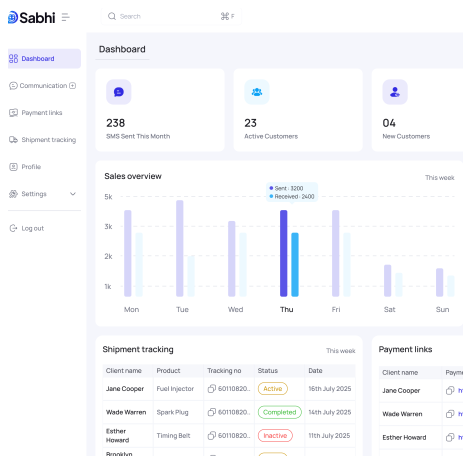
Sabhi places messaging and shipping events on one screen, tied to the order timeline. Operators do not jump between apps to keep customers informed. The same thread holds the quote, the payable invoice, the label, the tracking posts, the delivery proof, and the RMA if needed.
- Automated updates without switching tools. When you create a label, Sabhi shares the tracking number in-thread. As the package moves, key events post back automatically. At delivery, proof is attached to the same timeline.
- A2P-safe messaging and audit trail. Messages follow carrier rules for opt-in and opt-out. Every update is time-stamped with the user or system actor that triggered it. If a dispute appears, export one packet instead of collecting screenshots.
- Integrated where it matters. Sabhi works alongside your current systems. You do not need to replace your yard or order software. You standardize the handoffs around it
- Impact on revenue. Recyclers and logistics SMBs using a unified “quote → pay → ship → RMA” flow report fewer disputes and faster collections because customers see progress and staff can prove what happened.
The result is confidence. Customers know where their shipment stands. Your team spends less time answering status questions and more time moving orders forward.
Impact on disputes and repeat business
Real-time notifications are not just a courtesy. They change outcomes.
- Dispute prevention. When buyers can see label creation, in-transit, and delivery proof in one thread, “never received” claims fall. The packet is ready if a case opens
- Faster collections. Accounting does not chase proof. The delivery confirmation sits next to the invoice and receipt. Collections move faster because the facts are easy to share.
- Lower support load. Status questions drop. The conversations that remain are higher value.
- More repeat orders. Reliable updates create trust. Trust becomes reorders without discounts.
If you are already tracking disputes per 100 shipments and average time to collect, expect both numbers to improve after you automate updates and keep them in one place.
Two-week implementation plan
This plan assumes a small team that wants results without drama.
Week 1: Wire the events
- Move order confirmation into the same thread that holds the quote and payable invoice
- Connect label creation so tracking numbers post back automatically
- Turn on in-transit and out-for-delivery posts with default quiet hours
- Add delivery proof to the timeline
Week 2: Close the loops
- Publish a short “change request” and RMA form with reason codes and optional photos
- Train operators to keep all customer contact in the same thread
- Create a one-click export that compiles order, message history, and delivery proof
- Review five recent shipments together and check that the timeline reads like a story
FAQs you can reuse with customers
Will I get spammed with updates?
No. You receive only key milestones. You can ask a question in the same thread at any time
Can I change the delivery address after I order?
Before pickup, use the “Need a change?” link in your order thread. After pickup, we can request a hold or redirect with the carrier when possible.
How do I start a return?
Use the “Start a return” link in your order thread. Add a short reason and optional photos. We will reply in the same place.
What to do next
- See the workflow: quote to payment to shipping to RMA with live updates on one screen → Product overview
- Start a trial: set up confirmations, tracking posts, delivery proof, and RMA flow in under a day → Start trial